intellij-gpvp-gradle
【GPVP】Gradle开发版本管理小助手介绍及EULA Gradle development version management assistant & EULA
This project is maintained by joker-pper
IDEA plugin Gradle With Me Pro is now available, Gradle development version management assistant!!!




💡 Preface
To do a good job, one must first sharpen their tools! Lightweight and fast is our original intention, and we will definitely move forward to save you a lot of time and effort! Let more time and value stay in more important places!!!
I hope it can become a truly valuable plugin, avoiding everyone from spending more energy and effort on these tedious processes. Of course, this also requires your support so that we can provide better services and iterations. Altruism and self-interest can coexist. Let's go further together!
Welcome everyone to join the communication group, not only can you get the latest plugin resources in the first time, but you can also communicate and learn together!
QQ communication group: Click to add to group
WeChat communication group: On the WeChat official account “新程快咖员” (Click to view QR code) Leave a message "WeChat group" to get it
🌟 What is IDEA plugin Gradle With Me Pro(GPVP) ?
Gradle Project Version Plugin, Support Quick Update Version And Show Project Version And Search Project Version And Quick Generate Badges For Common Project Version And supporting synchronization of SDK and Gradle build and other configurations.
Note: If you are using Maven, the corresponding IDEA plugin is Maven With Me Pro(MPVP)
✨ Features
Support quick upgrade/rollback of Gradle project version
Whether it's a snapshot version or a release version, simply input and submit with one click to easily help you upgrade or roll back version values (no longer have to worry and spend a lot of time adjusting version values). We will also show you the specific details of the modifications~Simplify your workflow and save you a lot of valuable time!
Note: Only limited standard formats are supported. If there are any issues, feedback can be provided
Support Gradle project version display
Version values can be displayed directly in the project view, and the current version can be known at a glance, providing the ability to customize display rules.
Support Maven/Gradle project dependency version search
Support querying the latest dependency versions of the central repository, as well as quickly querying the dependency versions of the Nexus repository (remote/private). Simplify your workflow and save you a lot of valuable time!
Provide convenient search capabilities (Maven pom configuration or Gradle dependency configuration can be pasted and queried, or searched by keywords), one click copying of dependency coordinates,
One click access to file directory (compatible with lower versions of Nexus),One click loading update time (compatible with lower versions of Nexus), quick view of version details page, etc. Welcome to experience it~
Support Generate badges for Maven/Gradle project versions
Support for quickly generating badges for common Maven/Gradle project versions (relying on shields. io capability). Provides common parameter usage for quickly customizing text and colors. Provide support for groupId+artifactId quick input capability(such as Maven pom configuration or Gradle dependency configuration pasting), and built-in jump links for commonly used badges(such as version links published to the central repository release jar) and custom jump links to generate badges for you Provide certain convenience~
Support Project Settings Synchronous
Automatically synchronize JDK, language level specifications, Gradle Build, and other configuration features! Whether it's individual development or team collaboration, one person configuration, shared by all! (Need to submit configuration to remote repository)
Automatically recognize and switch to the corresponding JDK version and Gradle Build configuration, whether in project opening, Git clone, Git branch switching, Git rollback, or other scenarios!!! Further unify the team SDK specifications and save the tedious steps and time required for teams or individuals to manually configure IDE environments multiple times!!!
Other instructions: The '~' in JDK Home Path represents the user's home directory, which is used to dynamically identify a unified path under different usernames.
Note: To learn more, please click here for detailed features
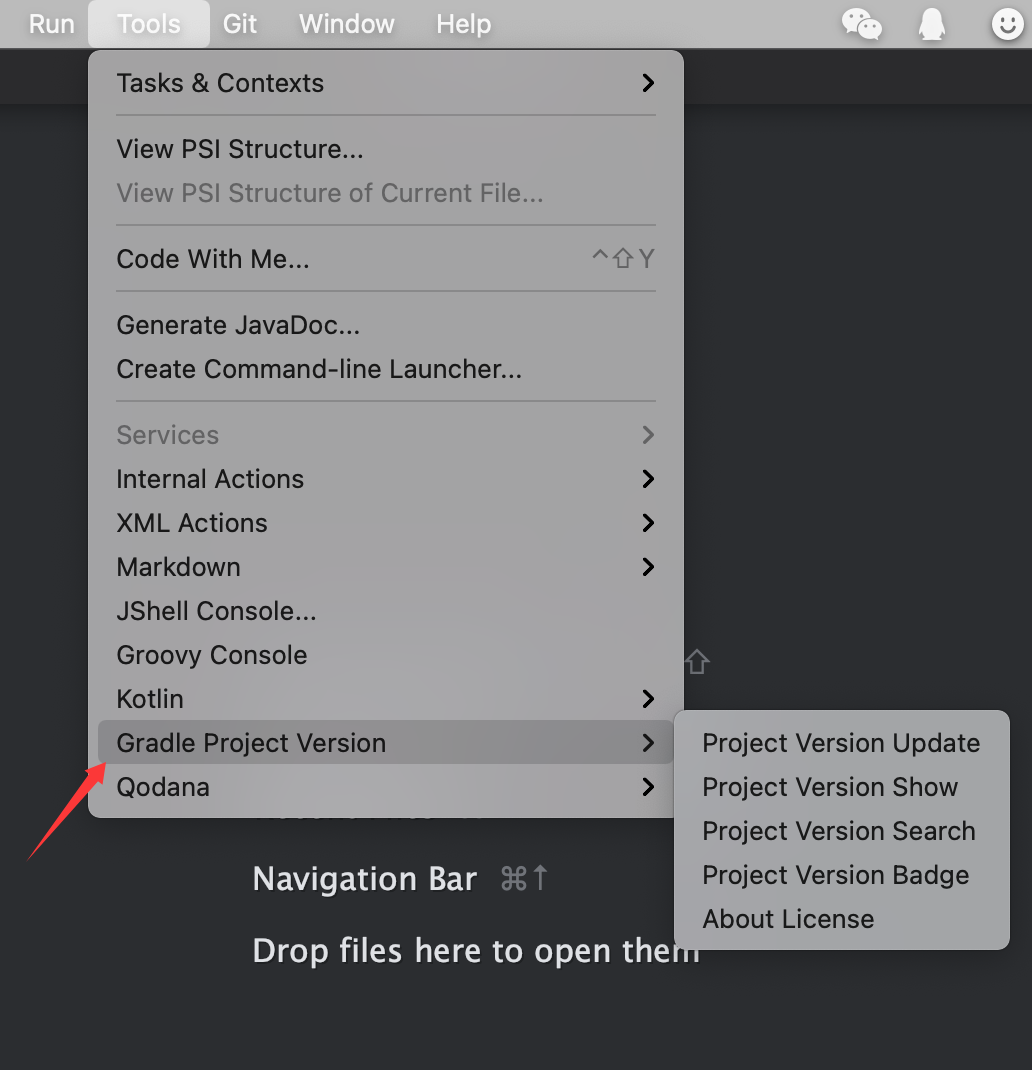
❓ How to find the operation menu?
Tools > Gradle Project Version
❓ How to configure Nexus access permissions?
How to configure Nexus access permissions for IDEA plugin Gradle With Me Pro?
📌 Other
conf.properties
Can be used for configuring personalized items
-
global configuration: user home/gpvp/conf.properties
-
project configuration: user project work dir/.idea/gpvp/conf.properties (Highest priority)
The supported configurations are as follows:
# customize language usage
#my.language=zh_CN
#my.language=zh_TW
#my.language=en


# search for Nexus3.x to view new url for remote repository version usage (when there are multiple values use , split)
#search.nx3.repository-version-use-new-url=http://localhost:8081/
#search.nx3.repository-version-use-new-url=http://localhost:8081/,http://localhost:8083/

# search nexus cache save period (Unit: minutes, value should be > 0, use default value 360 when not configured or illegal)
#search.nx.cache-save-period=360

# user's private nexus server release query result cache period, and 30 minutes by default when not configured (Unit: minutes, value should be > 0 and <= 360. When not configured or < 1, use default value; when value > maximum value, use default maximum value)
#search.user-repository-search-result.release-cache-period=30

# user's private nexus server snapshots query result cache period, and 1 minutes by default when not configured(Unit: minutes, value should be > 0 and <= 360. When not configured or < 1, use default value; when value > maximum value, use default maximum value)
#search.user-repository-search-result.snapshots-cache-period=1


# Copy Gradle coordinates in Kotlin format, default to false if not configured
#gradle-coordinate-copy-with-kotlin=false

# Whether to enable Gradle to automatically load Nexus repository URLs, default to true if not configured
#enable-gradle-auto-load-nexus-repository-urls=true

# Whether to enable the handling of line ending comments in updated versions, default to true when not configured
#enable-update-version-end-of-line-comment-mark-deal=true

# Whether to enable support (Copy shortcut keys through keyboard) for selecting multi row copying (maintaining the original mechanism) and support for copying single row and single column result values. If not configured, default to false
#enable-search-version-table-input-key-enhance-copy=true
Internal System Language
- zh Chinese
- zh_CN Simplified Chinese(China)
- zh_TW Chinese(Taiwan)
- en English
How to Specify The Current Used Language?
You can use the default language of the system or specify the language to be used in conf.properties
💬 Contact Us
If you have any questions or suggestions, you can do so through the following methods:
Submit Github Issues
QQ communication group: Click to add to group
WeChat communication group: On the WeChat official account “新程快咖员” (Click to view QR code) Leave a message "WeChat group" to get it
WeChat official account: “新程快咖员” (Click to view QR code)
Email: yyc_xincheng@163.com